

Scenarios and Flows
This page describes the withdrawal and deposit flows between Sygna VASPs and VV members:
- Withdrawals: how to send a permission request when you’re the originating VASP and a VV member is the beneficiary VASP.
- Deposits: how to respond to a permission request when a VV member is the originating VASP and you’re the beneficiary VASP.
Withdrawal: You → VV Member
You are the Originating VASP. The withdrawal process includes four steps:
- Select a VV member as the Beneficiary VASP.
- Verify the beneficiary wallet address.
- Send the permission request and wait for the verdict.
- Transfer the assets and report the transaction ID.
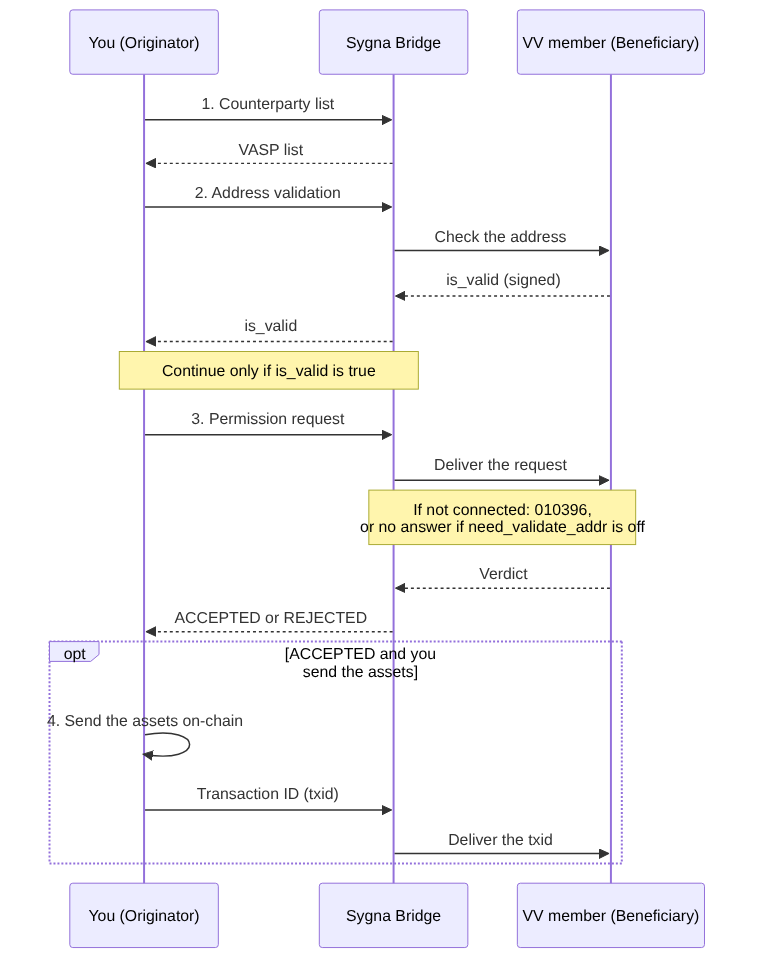
1. Select the beneficiary VASP
Find the VV member in your counterparty VASP list (Bridge API: GET /vasp; Hub and Gate: global-vasp), then check that:
- The VV member is listed and its status is healthy. The list includes the VV member's public key (
vasp_pubkey). If you use the Bridge API, you need this key to encryptprivate_info. - You're connected to the VV member. You can send permission requests only to VV members that have turned on VV Connect for your VASP, which requires completing counterparty due diligence (CPDD) first. For details, see Before You Start, step 1, in the Overview.
- The VV member supports your asset. See Before You Start, step 3, in the Overview.
2. Validate the beneficiary address
Address validation tells you whether the address belongs to a customer of the VV member. Call POST /address-validation before you send the permission request. In Hub and Gate, if need_validate_address is on (the default), address validation runs for you automatically.
Note: Address validation doesn't check the customer's name.
Request fields (Bridge API):
vasp_code: the VV member's VASP code.currency_id, orcurrency_id_v3withplatform.addrs: the address. For XRP, include the destination tag inaddr_extra_info.- Your signature.
Response
The VV member signs the response:
is_valid=true: the address belongs to a customer of the VV member.is_valid=false: the VV member doesn't recognize the address or doesn't support the asset. Ifreason_messagecontainsUNKNOWN-SYMBOLorUNKNOWN-NETWORK, the asset isn't supported. Hub and Gate show the status "Transfer To Beneficiary Failed" (status 4) with error06000.010396(HTTP 503) is an error, not a validation result. It means one of the following: the VV member can't be reached, it hasn't turned on VV Connect for your VASP, its account is disabled, or its system couldn't reach a decision. The error doesn't tell you which. First check your connection with the VV member. If the error continues, contact [email protected].
The VV member checks every address in the request and returns true only if all of them belong to it. Send only one address per transfer.
3. Send the permission request
Required fields:
-
transaction: your VASP code, the VV member's VASP code, one beneficiary address,currency_id, andamount. -
private_info: data in IVMS 101.2023 format, including:- Originator: name, address, identification, and date and place of birth.
- Beneficiary: surname, given name, and account number.
Bridge API users must encrypt
private_infowith the VV member's public key. Hub and Gate buildprivate_infofrom the fields you enter.
Optional fields: need_validate_addr, expire_date, and other_cdd_info.
other_cdd_info is for sending information only. Bridge API users must encrypt it with the VV member's public key. Hub and Gate users enter it as plain text in the transfer's other_cdd_info field, and Hub and Gate encrypt it for you. The VV member's system stores the information and shows it when the VV member opens the transfer, but not in the transfer list. The VV member doesn't reply to it, and it doesn't affect the verdict, so don't assume the VV member will read it.
How the VV member responds
- Verdict.
The VV member usually responds within seconds, but some cases take longer. Only aVERIFIEDresult from the VV member becomesACCEPTED. All other results becomeREJECTED. Forreject_codeandreject_messagevalues, see Reasons forREJECTEDbelow. - Reading the verdict.
Get the verdict from the callback you provided in the request, or check the status:- Bridge API:
GET /transaction/status - Hub API:
GET /transactions/{id} - Gate: the Data Transfer page in the console
- Bridge API:
- Names.
Send both the surname and the given name. VV members and Sygna use different name-matching rules, so a match doesn't mean the full name matched. - Response deadline.
VerifyVASP doesn't enforceexpire_date.- Hub and Gate mark a
Blockedpermission request asExpiredafter itsexpire_date. If you don't setexpire_date, the default is 30 days. - Sygna Bridge doesn't change the status of a permission request after its
expire_date, but it rejects any verdict that arrives after that date with010400. If you no longer need a permission request, cancel it.
- Hub and Gate mark a
- CDD.
You can't send an enhanced CDD request to a VV member withPOST /transaction/cdd. The call returns010408. To provide additional information, useother_cdd_info.
No duplicates.After you receive a verdict, don't send the same permission request again. Sygna Bridge rejects it with
010217.
Reasons for REJECTED
REJECTEDWhen a VV member rejects a permission request, Sygna Bridge returns a BVRC code in reject_code, and the VV member's reason in reject_message.
| Reason | reject_code | reject_message | What to do |
|---|---|---|---|
| Unknown address, or XRP address without a tag | BVRC008 | UNKNOWN-ADDRESS | Check the address, asset, network, and tag or memo. |
| Name doesn't match | BVRC007 | Text written by the VV member, for example Natural person name is not matched | Check the surname and given name. Don't send the assets. |
| Asset or network not supported | BVRC001 | UNKNOWN-SYMBOL or UNKNOWN-NETWORK | Don't send the assets. Check whether VerifyVASP supports the asset. |
| Customer hasn't completed KYC with the VV member | BVRC999 | UNVERIFIED-KYC | Don't send the assets. |
| Multiple beneficiary addresses | BVRC999 | Multiple beneficiary addresses are not supported … | Send a separate transfer for each address. |
| Other decisions by the VV member | BVRC002, BVRC003, BVRC004, BVRC005, BVRC006, or BVRC999 | The VV member's reason: COUNTERPARTY-UNAVAILABLE (BVRC002), LIMIT-EXCEEDED (BVRC003), BLACKLISTED (BVRC004), INVALID-ENCRYPTION (BVRC005), or INVALID-FORMAT (BVRC006). Any other reason, such as NOT-ALLOWED, returns BVRC999. | Read reject_message. Don't send the assets. |
| VV member can't read your request | BVRC999 | A message that describes the problem, for example SYGNA request rejected: SYGNA private_info could not be decrypted: … or … IVMS101 version "101" is not supported …. If the beneficiary has no person type, you get The beneficiary VASP could not process this request (UNDEFINED-ERROR). | Check that your IVMS data uses version 101.2023 and that you encrypted it with the VV member's public key. |
reject_message contains the VV member’s reason for rejecting the permission request. If reject_message is empty, use the BVRC code in reject_code to find the general reason.
4. Transfer the assets and report the transaction ID
Send the assets only after the verdict is ACCEPTED. Then report the txid.
- Report the txid after you send the assets (
POST /transaction/txid). You can also send a txid after a rejection. The VV member keeps it. It can use the txid to find the transfer and return the assets. - Report the txid once. Do not send a txid again for the same transfer. The same txid again is ignored, and it is not sent to the VV member. A different txid replaces the old one and is sent to the VV member, but do not rely on this.
- Cancel only while there is no txid and no rejection.
If you try to cancel after you report a txid, the cancellation is refused, and:- Bridge API returns
010415. - Hub and Gate return
03059and don’t forward the cancellation to Sygna Bridge.
If you try to cancel after the VV member rejected your permission request,
- Bridge API returns
010417 - Hub and Gate return
03059.
- Bridge API returns
- Status. A VV member can check the permission request with a status inquiry. It shows
PENDINGbefore the txid,PROCESSINGafter it is sent, andCANCELEDafter it is cancelled. After a rejection it also showsCANCELED, until you report a txid. Then it showsPROCESSING. SoCANCELEDdoes not always mean that you canceled the transfer. If you canceled the transfer yourself, Bridge, Hub and Gate refuse a later txid. A txid after a rejection is accepted. It never shows on-chain confirmation. Check the chain yourself.
Deposit: VV Member → You
You are the Beneficiary VASP. The deposit process includes four steps:
- The VV member checks your wallet address (optional).
- The VV member sends a permission request.
- You return your verdict.
- You receive the transaction ID, or a cancel notification.
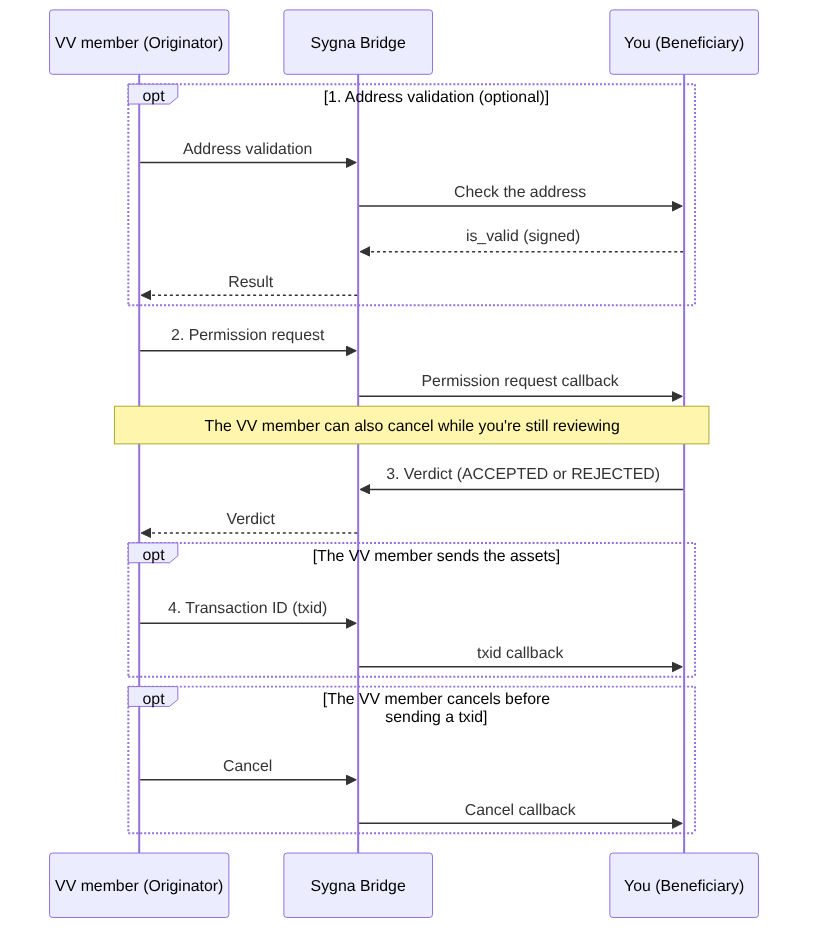
You don’t need to call any API to receive the deposit permission request. Sygna Bridge sends each message to the matching callback URL registered with your Sygna account.
For Bridge API users, make sure you’ve registered a separate callback URL for each of the following messages: (1) permission requests, (2) transaction IDs (txids), and (3) cancellations. You also need to respond to the permission request callback. If you don’t register the txid and cancel callback URLs, you won’t be notified when a txid arrives or a permission request is canceled.
For Hub and Gate users, callbacks are handled for you and the permission request appears in the console, so no further action is needed.
1. Respond to address validation
Optional step. A VV member can check whether a wallet address belongs to one of your customers.
The VV member can send this request before the permission request, but doesn’t have to. The check confirms only that the address belongs to one of your customers. It doesn’t check the customer’s name.
Your response. Sygna Bridge calls your address validation callback. Respond with a signed is_valid value.
Address not found. If the address doesn’t belong to one of your customers, respond with is_valid=false. The VV member sees UNKNOWN-ADDRESS. Any text you put in reason_message isn’t passed on to the VV member.
2. Respond to the permission request
Sygna Bridge calls your permission request callback. The request contains the VV originator’s data and your customer’s name and wallet address as the beneficiary, encrypted by the VV member with your public key.
- VV members only request your
ACCOUNT_NUMBER,NATURAL_PERSON_NAME, andLEGAL_PERSON_NAME. - By default, Hub and Gate require the originator’s name plus at least one other personal field: customer ID, identification number, physical address, or date and place of birth. If none of these is provided, the permission request is rejected with
BVRC006. Bridge API users can apply their own rules. - VV members send both the surname and the given name. Sygna requires only the surname and treats the given name as optional, so check both when the VV member sends them. If you check only the surname, a name that the VV member would have rejected may pass your check.
Response time. VerifyVASP sets no time limit on permission requests. If you don’t respond, the VV member sees the request stay inWAIT. In Hub and Gate, respond as soon as possible to any request inBlockedstatus. - VerifyVASP doesn’t support
POST /transaction/cdd-request. If you request enhanced CDD data from a VV member, you get 010408. If a request doesn’t include enough information, reject it and explain why inreject_message.
3. Send your verdict
- Bridge API: respond to the VV member’s permission request with
POST /transaction/permission. - Hub and Gate: respond in the console, or let your auto-accept rules respond for you.
The VV member sees your verdict as follows:
ACCEPTED appears as VERIFIED, with a message that starts with SYGNA-ATTESTATION:. The VV member doesn’t receive any beneficiary data from you.
REJECTED always appears as DENIED. Use a BVRC code and reject_message to explain why you rejected the request. For details, see What the VV member sees below.
What the VV member sees
| Your response | What the VV member sees |
|---|---|
ACCEPTED | VERIFIED. The message starts with SYGNA-ATTESTATION:. |
REJECTED BVRC001 | DENIED / UNKNOWN-SYMBOL. The message is BVRC001: <your reject_message>. |
REJECTED BVRC002 | DENIED / COUNTERPARTY-UNAVAILABLE |
REJECTED BVRC003 | DENIED / LIMIT-EXCEEDED |
REJECTED BVRC004 | DENIED / NOT-ALLOWED. Use BVRC004 only for risk screening or sanction blocks. |
REJECTED BVRC005, BVRC006, BVRC009, BVRC999 | DENIED / UNDEFINED-ERROR. The code stays in the message. |
REJECTED BVRC007 | DENIED / MISMATCHED-NAME |
REJECTED BVRC008 | DENIED / UNKNOWN-ADDRESS |
The VV member sees each rejection as a code, followed by a colon and the reject_message you provided. For example: : <reject_message>
Updated about 6 hours ago